A Week with Qubes OS on the NitroPad T480
Measured, not guessed: qube start times, memory use across two sessions, and what CPU load actually costs on 2018 hardware running Qubes 4.3.1.
Nitrokey lent me this NitroPad T480 free of charge for four weeks. Nitrokey had no editorial input. See Disclosures.
In the NitroPad review I covered the hardware and the security model. The question left open there was the practical one: can you actually work on this machine with Qubes OS, or is it a system you find impressive and then don’t use?
After a week I have an answer, and this time not by feel. I wrote two small scripts that log memory, CPU, and start times, and measured across two sessions. The numbers are below, the scripts are linked at the end.
The machine is a NitroPad T480 (a loaner from Nitrokey) with an i5-8350U, 32 GB of RAM, and Qubes OS 4.3.1.
How long a qube takes to start
This is the number you notice most in daily use. I measured from the start command to the moment the GUI process exists inside the qube, which is shortly before the window is rendered.
| Qube | Template | first start | after that |
|---|---|---|---|
| personal | fedora-43-xfce | 18.5 s | 10.3 s |
| HTB | parrot-htb (minimal) | 14.8 s | 8.1 s |
Three things stand out.
The first start of the day costs about six seconds extra. A qube never starts alone: if it sits behind a VPN qube, that one has to come up too. For personal that was the Mullvad qube, for HTB the VPN gateway qube. From the second start onwards the chain is already running.
The leaner template starts faster. parrot-htb is a minimal Parrot with two deliberately chosen tool classes and comes in two seconds under the full Fedora XFCE template. Installing only what a qube needs pays off measurably.
Whether the qube ran before makes no difference. I measured cold and warm; the gap is in tenths of a second. Start time is dominated by Qubes overhead, not by whether the template is still cached.
In practice: you wait when starting a qube, noticeably. Once it’s open, launching another program inside the same qube is instant.
Memory: what 32 GB carries in practice
Two sessions, recorded a few days apart.
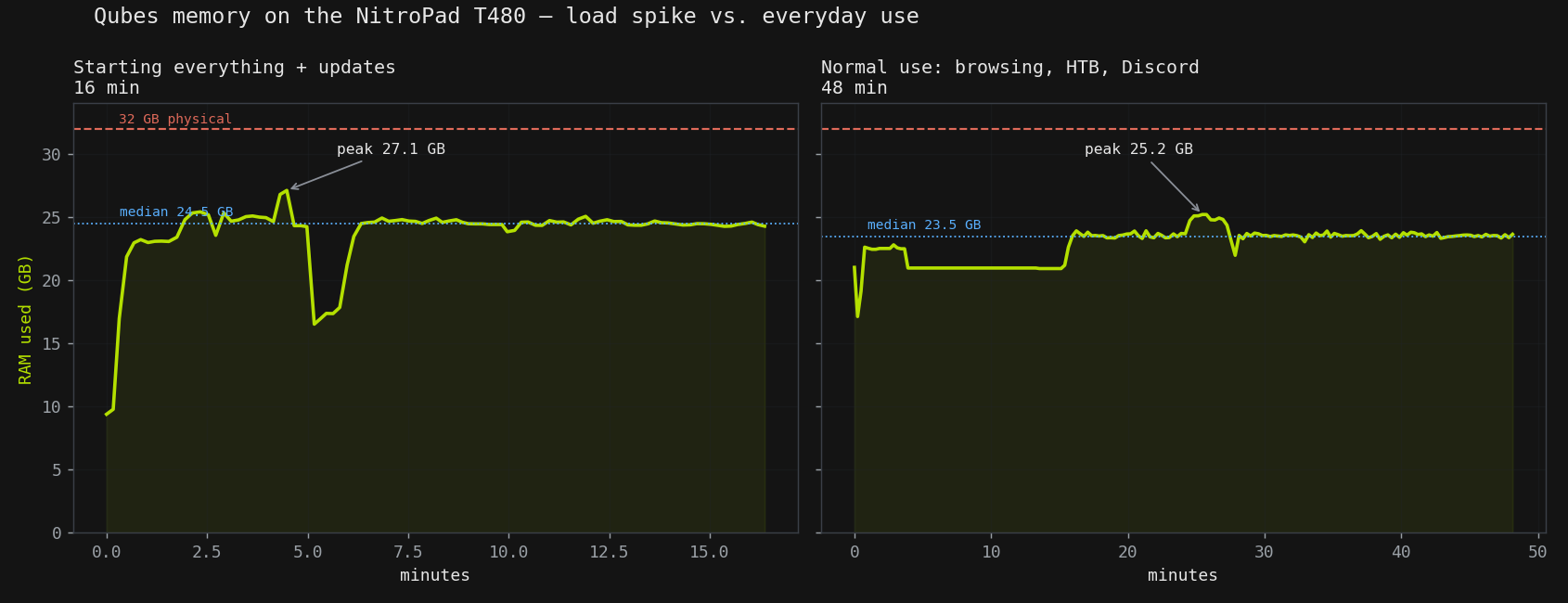
Session 1, starting everything plus updates (16 min): peak 27.1 GB with twelve qubes running. That is the worst case, not everyday use: Qubes spins up additional disposable VMs for template updates, which briefly take memory.
Session 2, normal use (48 min): median 23.5 GB with thirteen qubes, ranging from 17.1 to 25.2 GB. That leaves 8.5 GB of headroom at the median.
Memory per qube runs higher than you might expect:
| Qube | avg RAM |
|---|---|
| discord | 3.9 GB |
| HTB | 3.9 GB |
| personal | 3.2 GB |
| Mullvad | 3.1 GB |
| htb-vpn | 2.9 GB |
| disposable VMs | 0.3–0.4 GB |
Xen allocates generously and hands memory back under pressure, so these figures show allocation under load, not a hard minimum. It still adds up: four active working qubes plus the infrastructure gets you to 20 GB quickly.
So the answer to “is 32 GB enough” is: for this usage profile yes, with room, but not lavishly. Three or four more heavy qubes and you’d be at the limit. If that ceiling matters for your workload, the T480 platform can be equipped with up to 64 GB — worth knowing, because on Qubes, where every qube is its own VM, RAM is the resource you run out of first.
What CPU load actually costs
The more interesting figure, because it splits by activity. Broken down in five-minute windows:
720p video in an AppVM loaded two vCPUs almost completely, sitting steadily at 175 to 185 percent. Qubes passes no GPU acceleration through to AppVMs, so every frame is decoded in software. I gave the qube more vCPUs after that, and it played smoothly.
Some context: I don’t normally watch video on Qubes. That was a test, not a usage profile, and as a test it’s a harsh one, because video decoding is exactly what older hardware struggles with in virtualised environments.
An HTB box through the Parrot qube sat at around 80 percent for a quarter of an hour straight, with Discord and the browser running alongside.
Neither case felt sluggish.
Where it grates
Copy-paste between qubes runs through Ctrl+Shift+C in the source qube and Ctrl+Shift+V in the target. Inside a terminal that collides with the terminal’s own copy shortcuts, so right-click turned out to be the more reliable route. A small thing, but it comes up daily.
Moving files between qubes is qvm-copy, or qvm-copy-to-vm from dom0. That sounds more awkward than it is. After two days it was habit, same as qvm-run.
Suspend and closing the lid worked without trouble, and Wi-Fi was back after waking. On a Linux laptop that is not a given.
The cold start remains the thing that costs patience. Ten seconds per qube sounds like nothing, but starting four qubes in the morning means sitting and waiting.
What I can say after a week
Sometimes you notice the age of the CPU. Starting several qubes, the video test, occasionally switching between applications: the system feels sluggish. That isn’t an outlier, it’s the price of 2018 hardware plus virtualisation.
If that CPU age is the sticking point, the same platform can be configured with an i7 for a bit more headroom, and Nitrokey also sells newer, faster models (the V54 and V56) that would make for a very different — and more expensive — Qubes experience. I only tested this i5 / 32 GB loaner, so I can’t speak to those from measurement; I can only point at them as options if the 2018 hardware is a dealbreaker for you.
Beyond that, working on it feels good. After a day or two qvm-copy and switching qubes are habit, and the isolation that looks like overhead at first becomes something you don’t want to give up. Discord runs in its own environment, the HTB work in another, the browser somewhere else again. If something goes wrong there, it affects exactly one qube.
That’s also the condition: you have to want the security model. Anyone just looking for a fast laptop will experience the start times and the adjustment as drawbacks without getting anything in return. Anyone interested in separating attack surfaces gets a system that delivers exactly that, and the 32 GB carry a realistic working profile.
What a week can’t answer stays open: how battery and hardware hold up over months, and whether the start times become an annoyance or just routine.
The measurement scripts
Both run in dom0, are read-only (except the start-time script, which starts and stops the qube it measures), and are MIT licensed:
qubes-session-recorder.shlogs memory, CPU, and running qubes into a CSVqube-starttime.shmeasures start times across several runs
They’re on GitHub: Mickhat/nitropad-measure-scripts