YubiKey 5C Nano and 5C NFC: A Week In
First impressions of the YubiKey 5C Nano and 5C NFC after a week: a fixed key that never leaves the desk, a mobile one that goes everywhere, and why the pair covers each other.
Yubico sent me both keys free of charge for review: the YubiKey 5C Nano (€80.92) and the YubiKey 5C NFC (€69.02). This did not influence the content — my opinions are my own, including the critical ones.
A hardware security key is one of the few security products where the pitch matches reality. There’s no scoring, no heuristic, nothing that depends on me noticing an attack. The key checks the domain, the domain doesn’t match, and the key does nothing. Phishing stops being a judgement call.
I’ve had these a week, which is enough to say how they fit into a daily setup but not enough to talk about durability or the long tail of services that don’t support them. So this is first impressions, not a verdict. What I can already say is that the split between the two keys is the interesting part, and it’s the thing to get right before you buy.
The pair, briefly
| 5C Nano | 5C NFC | |
|---|---|---|
| Connector | USB-C | USB-C |
| NFC | No | Yes |
| Form factor | Sits flush in the port | Standard keyring key |
| Protocols | FIDO2/WebAuthn, U2F, PIV, OpenPGP, OTP, OATH | Same |
| Price | €80.92 | €69.02 |
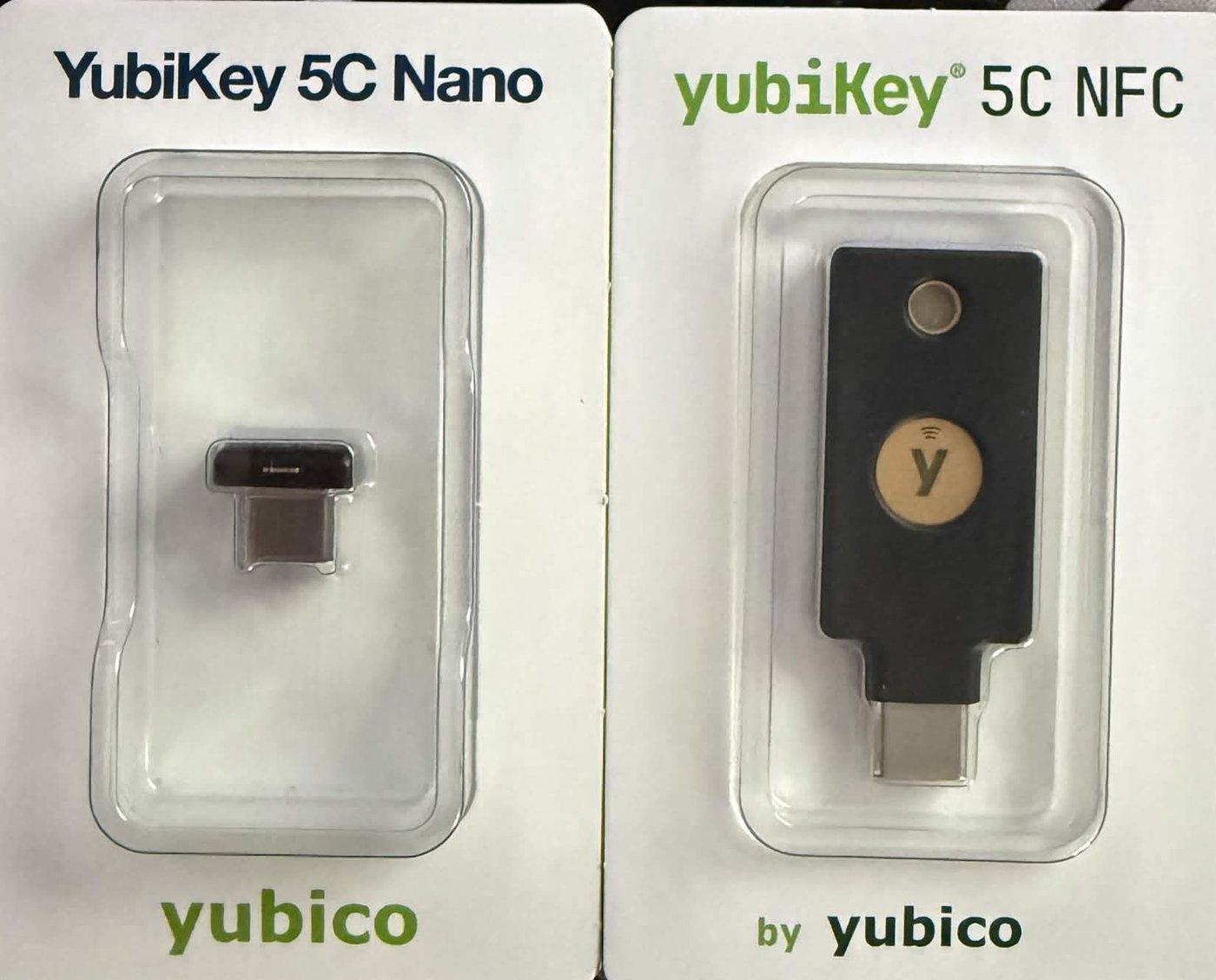
Same protocols, same silicon, very different objects. The size gap is the whole reason to own both rather than two of either. Both are USB-C only, no USB-A, which matters if your hardware is mixed. More on that below.
How the split works
The two keys do different jobs, and the division is physical.
The 5C Nano lives in a USB hub on my desk and never leaves the house. It sits flush enough that you’d have to know it’s there, and having it in the hub rather than round the back of the machine means touching it is a reach forward instead of a fumble behind the tower. Over a week it’s become the thing I touch without thinking about it, which is what you want from a key that’s asked for often.
The 5C NFC goes everywhere I do. It’s the mobile key, on me rather than in a drawer, so when something wants a second factor away from the desk it’s already there. Tap it to the back of the phone over NFC, done, no cable.
Both keys are registered on everything, and that’s the part worth copying. Because the NFC is the one that travels, it’s also the one that can get lost or stolen — and if it does, the Nano is still sitting safely at home with access to the same accounts. Neither key is a single point of failure. That’s a cleaner arrangement than the usual “daily key plus a backup key in a drawer”, because the backup isn’t waiting idle for an emergency; it’s in use every day.
Registered on both, so far:
- Vaultwarden — my self-hosted password manager. FIDO2 as the second factor on the account. This one took an evening to get working, and none of it was the key’s fault. Separate post.
- GitHub — 2FA, and commit signing, so a signed commit means the key was physically touched rather than a signing key sitting in a dotfile.
Recovery codes for both are stored offline, away from the vault. I’ll come back to why that specific detail is not optional.
The Nano’s form factor is the whole pitch
For a fixed machine, the Nano is close to ideal. It disappears into the port, it’s always present so there’s nothing to plug in, and it’s out of the way until something needs it.
The tradeoff is the mirror image of the virtue: a key that lives in a machine is a key that’s physically on that machine. For a desktop in a locked flat that never travels, that’s fine. The threat model is remote, and a remote attacker still can’t touch the key. I wouldn’t put a Nano in a laptop that rides around in a bag, though. A key permanently in a machine that leaves the house isn’t really a second factor once the bag is gone. That’s exactly why the travelling key here is the NFC, not the Nano.
Set a FIDO2 PIN either way. It means possession of the key alone isn’t enough, and Yubico’s Authenticator will show you whether FIDO2 is enabled and let you set one.
Where the NFC fits, and where neither does
The NFC covers the phone cleanly. No adapter, no cable, tap and go, and after a few days I’d stopped thinking about it.
Where neither key helps me: my ThinkPads. The X220 and X230 are USB-A, the 5C keys are USB-C, and no adapter makes that a good idea for a security key. That’s on me for running fifteen-year-old laptops, not on Yubico, but if your hardware is mixed, check your ports before you buy. A properly complete set for me would be three keys including a USB-A one, and that’s where the cost starts to add up.
What will bite you
FIDO2 PIN lockout. Eight wrong PIN attempts locks the FIDO2 application. Recovering means a reset, and a reset wipes every FIDO credential on the key. Not the registrations on the services, which stay behind and are now orphaned. Which leads directly to the next point.
Recovery codes are not optional, and where they live matters. Every service you add a key to hands you a recovery code. Store it offline, printed or on an encrypted stick, and specifically not inside the password manager those keys protect. If both keys ever go and your only recovery code is behind the vault the keys unlock, you’re locked out of the thing that holds the way back in. It’s a circular dependency, and it’s the most common way people lock themselves out of their own setup.
Registration is fiddlier than the box implies, and never on the key’s side. Self-hosted services get their domain config wrong, password manager extensions grab the passkey prompt before the OS sees it, and browsers refuse WebAuthn with errors that explain nothing. My Vaultwarden setup took an evening of exactly that, and a review that only tested a Google login would never have hit any of it.
Not everything supports it. Plenty of services still stop at TOTP. The keys can hold TOTP secrets through Yubico Authenticator as a fallback, which is better than nothing but isn’t phishing-resistant and shouldn’t be treated as if it were.
The price
Two keys is the real minimum, so the entry cost is roughly €150 rather than the price of one, and it’s worth saying that plainly instead of pretending the second is optional. One key guarding everything you own is a single point of failure, which is the exact thing you bought it to remove.
Against that: no subscription, you buy them once, and the thing they prevent (a takeover on a password manager or a work account) costs a lot more than €150 to clean up. Cheaper FIDO2 keys exist and the protocol is identical. What Yubico charges extra for is the spread of protocols on one key, the Nano form factor that nobody else matches, and the track record. Whether that’s worth it depends on how much of the spread you’ll use.
First impressions
After a week: the split works. A fixed key that vanishes into the desk and a mobile one that covers everything away from it, both registered everywhere so neither is a single point of failure. The Nano in particular is the most out-of-the-way piece of security hardware I own, and out-of-the-way is the right quality for something you use daily.
The thing to know before buying is the same thing that makes the setup work: which key goes where. Put the Nano somewhere fixed, keep the travelling key off any machine that stays home, register both on everything, and put the recovery codes somewhere the keys don’t guard.
What I can’t tell you yet is how they hold up. The Nano sits in a port that gets knocked, the NFC rides against actual keys in a pocket, and a week is nothing for either. If anything changes over the next few months I’ll update this.