From FRITZ!Box to TP-LinkBox 7: Measuring What Changes in a Home Network
A test log: iperf3 LAN baselines at gigabit and 2.5GbE, Ookla internet measurements, where those TCP retransmits actually came from, and why WSL2 is a poor place to benchmark a fast network.
TP-Link provided the hardware in this test free of charge: the LinkBox 7, a 5-port 2.5GbE switch, and an RE220BE extender. Whether it’s a loan or stays here isn’t settled yet. This is also an ongoing test log rather than a finished review: I’m publishing measurements as I take them, including the parts I can’t explain yet, and correcting sections as tests complete. There’s a list of what’s still missing at the end.
I replaced the 1&1 FRITZ!Box that came with my DSL line with a TP-LinkBox 7, on the connection I use every day, with a desktop, a ZimaBoard running services and a handful of IoT devices hanging off it.
“Is the TP-LinkBox faster than the FRITZ!Box?” has a dull answer: with a gigabit endpoint both routers sit at the wire limit, so there is nothing to win. What I’m after is what the swap does in a home network with 2.5GbE, a homelab and IoT.
Specifications
| TP-LinkBox 7 | |
|---|---|
| DSL | VDSL modem with Super-Vectoring, up to ~300 Mbit/s |
| WAN | 1× 2.5 Gbit/s |
| LAN | 1× 2.5 Gbit/s, 2× 1 Gbit/s |
| Wi-Fi | Wi-Fi 7, dual band (2.4 + 5 GHz), up to 3.6 Gbit/s combined, MLO, Beamforming, EasyMesh |
| Telephony | DECT base for up to 6 handsets, analogue phone port |
| Other | USB 3.0, WPA3, multi-SSID, parental controls |
| Security updates | promised until 31 December 2031 |
There is exactly one 2.5 Gbit LAN port. The moment I want more than a single device on 2.5GbE, a switch stops being optional.
The support commitment until the end of 2031 matters too.
The setup
Before the switch:
- 1&1 FRITZ!Box as the main router, on a 1&1 DSL line
- A desktop with a Realtek Gaming 2.5GbE Family Controller
- A ZimaBoard as the local
iperf3server - Various clients on 2.4 and 5 GHz Wi-Fi
At this stage the 2.5GbE side of the router wasn’t testable: every endpoint I could measure against was still gigabit. That changed later, and the measurements are further down.
Baseline: the FRITZ!Box in gigabit LAN
I took a baseline before changing anything. The old network used 192.168.178.0/24, with the ZimaBoard at 192.168.178.118. Both the desktop and the ZimaBoard were connected at 1 Gbit/s.
I ran the iperf3 server directly on the ZimaBoard:
iperf3 -sAnd from the desktop:
iperf3 -c 192.168.178.118 -t 30| Test | Result |
|---|---|
| PC → ZimaBoard | ~942 Mbit/s |
ZimaBoard → PC (-R) | ~942 Mbit/s |
4 parallel streams (-P 4) | ~944 Mbit/s |
| Retransmits, single stream | 0 |
| Retransmits, 4 streams | 3 |
Over 30 seconds the single-stream test stayed at 930–950 Mbit/s essentially without dropping, the reverse test at 940–942 Mbit/s. That is practically the maximum of a 1-gigabit link.
The FRITZ!Box was not a bottleneck in gigabit LAN.
For reference, the Wi-Fi link rates the FRITZ!Box reported were 292–650 Mbit/s on 5 GHz and mostly 57–144 Mbit/s on 2.4 GHz. Those are negotiated PHY link rates, not throughput measurements, so they say little about real speed. Actual Wi-Fi throughput tests are on the list below.
Baseline: internet through the FRITZ!Box
Measured on 12 September 2026, around 15:19–15:21, with Ookla Speedtest against DNS:NET Internet Service GmbH, Berlin; the provider shows as 1&1 Versatel.
| Run | Download | Upload | Idle ping | Latency under DL load | Latency under UL load |
|---|---|---|---|---|---|
| 1 | 137.85 Mbit/s | 38.49 Mbit/s | 11 ms | 99 ms | 10 ms |
| 2 | 140.61 Mbit/s | 39.14 Mbit/s | 11 ms | 90 ms | 10 ms |
| 3 | 138.64 Mbit/s | 38.52 Mbit/s | 11 ms | 78 ms | 19 ms |
| Average | 139.03 Mbit/s | 38.72 Mbit/s | 11 ms | 89 ms | 13 ms |
Internet through the TP-LinkBox 7
Same Ookla server as the baseline, DNS:NET Internet Service GmbH, Berlin. Measured 15 September 2026, around 10:38.
| Run | Download | Upload | Idle ping | Latency under DL load | Latency under UL load |
|---|---|---|---|---|---|
| 1 | 127.44 Mbit/s | 37.42 Mbit/s | 9 ms | 81 ms | 12 ms |
| 2 | 127.43 Mbit/s | 37.57 Mbit/s | 10 ms | 87 ms | 14 ms |
| 3 | 126.76 Mbit/s | 37.46 Mbit/s | 12 ms | 82 ms | 12 ms |
| Average | 127.21 Mbit/s | 37.48 Mbit/s | 10 ms | 83 ms | 13 ms |
Against the baseline:
| FRITZ!Box | TP-LinkBox 7 | |
|---|---|---|
| Download | 139.03 Mbit/s | 127.21 Mbit/s |
| Upload | 38.72 Mbit/s | 37.48 Mbit/s |
| Idle ping | 11 ms | 10 ms |
| Latency under DL load | 89 ms | 83 ms |
| Latency under UL load | 13 ms | 13 ms |
Download comes out 8.5% lower, upload 3% lower, and latency 6 ms better under download load.
Before anyone reads a verdict into the download number: the two sets weren’t taken under the same conditions. The FRITZ!Box runs were on 12 September in the afternoon, these on 15 September in the morning. VDSL rates move with line conditions and time of day, and a three-day gap between measurements is enough to account for a difference of this size on its own. This is not a controlled A/B on the DSL side, and I won’t present it as one.
The DSL sync rate is what settles it, and the router reports it in its web interface. I’ve since read it off.
What the sync rate says
On 19 October I read the sync rate and then ran three Speedtests straight afterwards, so both numbers describe the same moment. For context: the line is booked at 250 Mbit/s and the in-house wiring is why it sits at half that.
| Sync rate | Speedtest average | |
|---|---|---|
| Download | 125.0 Mbit/s | 113.19 Mbit/s |
| Upload | 41.9 Mbit/s | 38.25 Mbit/s |
| Run | Download | Upload | Idle ping | Latency under DL load | Latency under UL load |
|---|---|---|---|---|---|
| 1 | 112.17 Mbit/s | 38.13 Mbit/s | 9 ms | 107 ms | 328 ms |
| 2 | 113.56 Mbit/s | 38.44 Mbit/s | 9 ms | 87 ms | 11 ms |
| 3 | 113.83 Mbit/s | 38.19 Mbit/s | 10 ms | 90 ms | 11 ms |
| Average | 113.19 Mbit/s | 38.25 Mbit/s | 9 ms | 95 ms | — |
The 328 ms in the first run is a single outlier against 11 ms in the other two, so an average of that column would be misleading. I’ve left it out rather than smoothing it away.
Throughput comes to about 91% of sync in both directions, which is what VDSL protocol overhead costs: PPPoE, PTM framing, IP and TCP headers. The router hands on what the line gives it.
Now set today’s result against my own September measurement, same router, same server, same method:
| Download | |
|---|---|
| 15 September | 127.21 Mbit/s |
| 19 October | 113.19 Mbit/s |
Eleven percent apart with nothing changed but the date. My line moves more across five weeks than the 8.5% that separated the two routers in September.
That gap therefore can’t be pinned on the modem. I never got a sync reading off the FRITZ!Box, so I can’t claim the two are equal either. What the numbers do show is that the method is too coarse to tell them apart: comparing two routers on a VDSL line days apart measures the line as much as the hardware.
One consistency check, since it’s cheap. If the router converts roughly 91% of sync into throughput, September’s 127.21 Mbit/s implies the line was syncing around 140 at the time — which is close to what the FRITZ!Box was delivering in that same window.
After the switch
The network now runs on 192.168.1.0/24:
Router / DNS   192.168.1.1
Desktop        192.168.1.19
ZimaBoard      192.168.1.6
The hardware itself feels well made: solid, more substantial than the plastic box it replaces.
The desktop is now connected at 2.5 GbE. Windows reports the Ethernet link at 2.5 Gbit/s on the Realtek Gaming 2.5GbE Family Controller, so that link works.
It doesn’t help yet, though, because at this point the other end of every test is still a gigabit ZimaBoard. That changes further down, once the switch arrives.
TP-LinkBox 7 in gigabit LAN
Same tests, new router:
iperf3 -c 192.168.1.6 -t 30| Test | Result | Retransmits |
|---|---|---|
| PC → ZimaBoard | Sender 941 / Receiver 940 Mbit/s | 209 |
ZimaBoard → PC (-R) | Sender 941 / Receiver 940 Mbit/s | 0 |
4 parallel streams (-P 4) | Sender 942 / Receiver 940 Mbit/s | 1485 |
Throughput-wise that is practically identical to the FRITZ!Box. The forward test stayed around 932–952 Mbit/s, the reverse test held 940–942 Mbit/s after the first second. Transfer volume was about 3.29 GB in both the single-stream and four-stream runs.
The four-stream retransmits split across streams as 265 / 397 / 385 / 438. Despite that, total throughput stayed at roughly 940 Mbit/s.
Side by side
| Test | FRITZ!Box | TP-LinkBox 7 |
|---|---|---|
| PC → ZimaBoard | ~942 Mbit/s | ~941 Mbit/s |
| ZimaBoard → PC | ~942 Mbit/s | ~941 Mbit/s |
| 4 streams | ~944 Mbit/s | ~942 Mbit/s |
| Retransmits, forward | 0 | 209 |
| Retransmits, reverse | 0 | 0 |
| Retransmits, 4 streams | 3 | 1485 |
On raw throughput there is no meaningful difference, and there can’t be: the ZimaBoard’s gigabit link is the limiting factor in every one of these tests.
The open question: those retransmits
The retransmit counts stand out.
The topology right now:
Desktop (Realtek 2.5GbE)
      │  2.5 Gbit/s
      ▼
TP-LinkBox 7
      │  1 Gbit/s
      ▼
ZimaBoard
My hypothesis is that the retransmits come from the 2.5GbE → 1GbE transition rather than from a fault in the router. The desktop can push data into the TP-LinkBox faster than the box can forward it over the gigabit link to the ZimaBoard, so packets queue and some get dropped and resent. Two observations point that way:
- 2.5G PC → 1G ZimaBoard produces many retransmits; 1G ZimaBoard → 2.5G PC produces zero.
- Four parallel streams produce far more retransmits than a single stream.
That is consistent with a speed-mismatch buffering effect. It is not proof, and at this stage I’m not claiming the TP-LinkBox 7 has packet loss or a network problem. Throughput was unaffected throughout: about 940 Mbit/s either way.
The cleanest way to test that hypothesis isn’t a rate limit — it’s removing the mismatch entirely. That became possible once the 2.5GbE switch arrived, so that’s what the next section does.
Wi-Fi: one rough data point
The proper Wi-Fi measurements are still outstanding, but one early check is worth noting. From a garden pavilion to the flat on the first floor, roughly 18 m away through two exterior walls and a floor, a Speedtest against the usual server landed somewhere around 60 Mbit/s.
Two caveats. I’m going from memory here rather than a saved result, so treat that as an indication and not a measurement; I’ll replace it once I’ve repeated it properly. And a Speedtest measures the whole path including the DSL line, not the Wi-Fi link on its own. The line tops out around 127 Mbit/s, so 60 does point at Wi-Fi being the limit at that distance, but the number that settles it is an iperf3 run against the ZimaBoard.
A 2.5GbE home network
Getting past that gigabit ceiling needed two things: a switch, and a 2.5GbE endpoint to put behind it. Both are here now. The switch is a 5-port 2.5GbE model, provided by TP-Link along with the router, and the endpoint turned out to be the ZimaBoard itself — it has two 2.5GbE ports and had simply been sitting on a gigabit link until now.
Five ports covers the current build: one to the router, one to the PC, and room for a couple of servers, with the slower gigabit devices hanging off the router directly instead of occupying 2.5G ports. Whether five stays enough is a different question — a NAS, another server, and the spare port is gone.
The topology:
TP-LinkBox 7
│
├── 2.5G → 2.5GbE switch
│           ├── PC        (Realtek 2.5GbE)
│           ├── ZimaBoard (eth0, 2.5GbE)
│           └── spare ×2
│
└── LAN → gigabit devices
And the same thing as hardware: switch at the bottom, drives in the middle, both ZimaBoards on top.
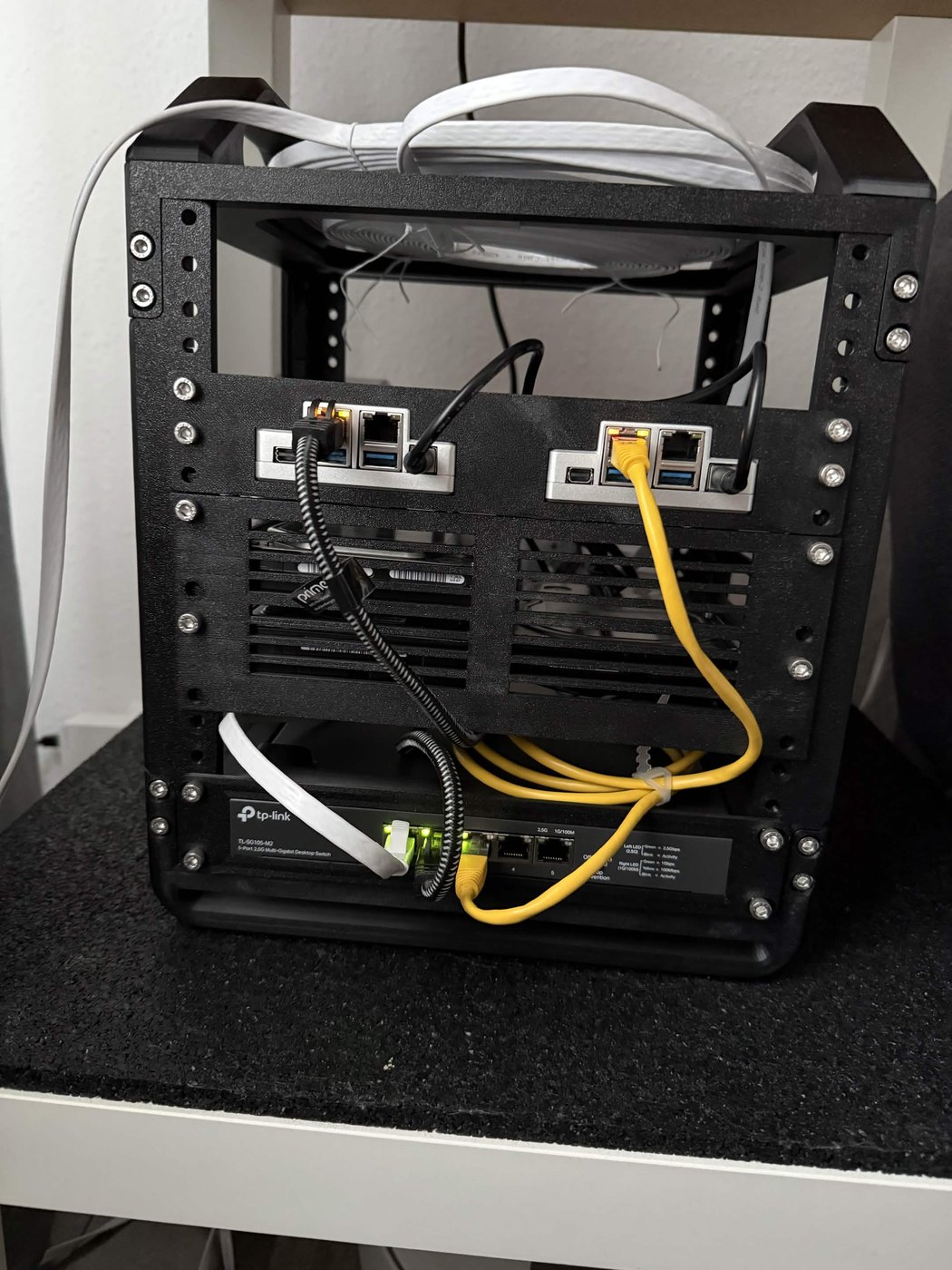
The frame is printed, and how it came about is its own post. The cable management is unfinished, which the photo makes obvious.
First thing to check, because this is where 2.5GbE setups quietly fail — a bad cable or a port that negotiated down leaves you measuring gigabit without noticing:
cat /sys/class/net/eth0/speed
2500
2.5GbE end to end
Same commands as before, both ends now at 2.5 Gbit/s:
| Test | Result | Retransmits |
|---|---|---|
| PC → ZimaBoard | 2370 Mbit/s | 0 |
ZimaBoard → PC (-R) | 2330 Mbit/s | 0 |
4 parallel streams (-P 4) | 2370 Mbit/s | 10 |
Throughput held steady for the full 30 seconds in every run — the per-second figures barely move off 2.37 Gbit/s, and the congestion window sits flat at 4.09 MB. For 2.5GbE that is wire speed.
That answers the open question
Put the two topologies side by side:
| Test | 2.5G → 1G | 2.5G → 2.5G |
|---|---|---|
| PC → ZimaBoard | 940 Mbit/s, 209 retr | 2370 Mbit/s, 0 retr |
| ZimaBoard → PC | 940 Mbit/s, 0 retr | 2330 Mbit/s, 0 retr |
| 4 streams | 940 Mbit/s, 1485 retr | 2370 Mbit/s, 10 retr |
The retransmits were the speed mismatch. Remove the 2.5G→1G transition and they go away: 209 down to zero, and the four-stream case from 1485 down to ten. Ten retransmits across 8.3 GB of transfer is background noise.
The next section is about my measurement setup distorting results, so it’s fair to ask whether it distorted these too. In all four forward runs the sender was the same machine through the same WSL2 stack, and the only variable that changed was the far end’s link speed. If the measurement environment had been producing those retransmits, the 2.5GbE rows would look like the gigabit ones. They don’t. The FRITZ!Box baseline fits the same picture: the desktop was still on gigabit then, so there was no mismatch, and that run showed 0 and 3 retransmits from the same WSL2 setup.
I can’t rule out that WSL2 inflated the 209 somewhat as a sender, because iperf3 on Windows won’t report sender-side retransmits and there’s no native figure to compare against. The mechanism is unaffected either way. Any TCP sender pushing 2.5 Gbit/s into a gigabit link loses packets and resends them, whatever operating system it runs.
So the hypothesis holds: the TP-LinkBox 7 wasn’t dropping packets of its own accord. It was forwarding traffic from a 2.5G sender onto a gigabit link, which is what any switch or router does in that position, and TCP responded with retransmissions. Throughput never suffered either way.
WSL2 as a measurement environment
There’s a catch in how those figures were produced.
I normally run iperf3 from WSL2 on the desktop. At gigabit that was fine, and all the earlier measurements in this article came from there. At 2.5GbE it stopped being fine, in one specific direction:
| ZimaBoard → PC | Throughput | Retransmits |
|---|---|---|
| receiving in WSL2 | 2330 Mbit/s | 943 |
| receiving natively on Windows | 2330 Mbit/s | 0 |
Same sender, same link, same speed. The only thing that changed was whether the receiving end was the virtualised network stack or the real one. Throughput came out identical in both, so there was nothing in the result to flag the problem. Had I only run the WSL2 test, I’d have published 943 retransmits and gone looking for a fault in hardware that doesn’t have one.
If you benchmark a 2.5GbE network from WSL2, check your numbers against a native run before drawing conclusions from them.
A caveat on the table above: iperf3 on Windows can’t read its own TCP retransmit counters, so the column is absent in native runs where the PC is the sender. The PC → ZimaBoard retransmit figures therefore still come from WSL2. Native and WSL2 runs produce the same throughput in that direction, so WSL2’s sending path isn’t interfering, but the numbers do come from two different environments and I’d rather say so than present one tidy table.
What the VPN server offers
I haven’t set a tunnel up yet, so this is a walk through the configuration pages rather than a test. Firmware 235.0.3, hardware version 1.0.
There are four entries under VPN Server, and they’re not four ways to do the same job:
| What it’s for | State out of the box | |
|---|---|---|
| WireGuard | remote access | off |
| OpenVPN | remote access | off, and no certificate yet |
| PPTP | remote access | off |
| IPsec | site-to-site | off |
IPsec is the one that surprised me. Its page asks for a connection name, a remote gateway and local and remote addresses, with dead peer detection as the only toggle. That’s for joining two networks, not for getting a phone onto your LAN from a hotel. Which means that for ordinary remote access the real choice is three protocols, not four.
WireGuard is a single toggle plus a user list: username, tunnel IP, allowed IPs, and a share column per user. That share column is the part that decides whether a VPN gets used or abandoned — handing someone a config rather than making them copy key material by hand.
OpenVPN wants more work. It won’t start until you generate a certificate, which the page says plainly before letting you enable anything. Defaults are UDP on port 1194 with a 10.8.0.0/24 tunnel subnet, and there’s a choice between granting clients the home network only or the home network plus internet access.
PPTP takes a username, a password, and a client address range. Up to ten clients. No certificate, no key exchange, nothing to generate — which is exactly why it’s easy, and exactly the problem.
Worth saying clearly: everything here is off by default. Nothing is exposed until you choose to expose it.
About PPTP
I’m not testing whether PPTP is secure. That question was settled in public in 2012, when Moxie Marlinspike and David Hulton showed that an MS-CHAPv2 handshake reduces to a single DES key and released a tool to do it. Cracking that key on rented FPGA hardware took under a day and cost about $20. Microsoft published an advisory and said it would not ship a fix, the weakness being in the protocol rather than an implementation, and in October 2024 deprecated PPTP in Windows Server.
What I can report is what the router does with that: it lists PPTP as one of three remote-access options, directly above WireGuard, with no warning text anywhere on the page.
Keeping the option isn’t indefensible — somewhere there’s a device that speaks nothing else, and removing it would strand whoever owns it. What’s missing is a sentence in that dialog. The person most likely to pick PPTP is the one who recognises the name from an office VPN years ago, and recognition reads as safety.
If you’re setting up remote access on this router, use WireGuard. The share column makes it the least painful option anyway, which is a rare case of the secure choice also being the convenient one.
The admin interface, on the other hand
The same box that offers PPTP without comment refuses to serve its own settings over plain HTTP. Point a browser at 192.168.1.1 and you don’t get a login form, you get a page explaining that HTTPS is required to meet European CE-RED rules, with a link to continue. The actual interface only loads over TLS.
That’s the right default, and it’s not one every router ships. It’s also a self-signed certificate, so the browser complains — which is unavoidable for a device with no public hostname, and a complaint I’d rather have than a login form in cleartext on the LAN.
Two decisions about security, in one device, pointing in opposite directions. The one that gets enforced is the one a regulator asked for.
The IoT network
The TP-LinkBox 7 offers a separate IoT network, and I want to find out what it separates before describing it. I plan to test each direction:
IoT → LAN
IoT → internet
IoT → other IoT devices
main network → IoT
Still to come
What’s outstanding, roughly in the order I’ll get to it:
Wi-Fi. Throughput measured with iperf3 at a few fixed positions on 2.4 and 5 GHz, which also replaces the rough pavilion figure further up. MLO with the two Wi-Fi 7 clients I have here, an Olares One and an iPhone 16 Pro. Mesh and roaming get their own article, since that’s a question about the extender rather than about this router.
IoT isolation. The four directions listed above, in a separate post, because what a router’s IoT network actually separates is a security question rather than a throughput one.
The built-in VPN server. Whether the protocols on offer actually connect. What they are is already worth a look, below.
Long-term stability, reboots and firmware updates aren’t a test so much as something that accumulates. I’ll note it if anything breaks.
Two things that were on this list and have come off it. Port forwarding works, and a router doing what every router does isn’t a finding. Power draw I’ve dropped as well: the box runs around the clock, but nobody picks a router to save a couple of watts, and the number wouldn’t change anyone’s mind.
Three things I was never going to cover: DECT and the analogue phone port, because I don’t use a landline and never did; USB storage, because a router’s USB port is a poor substitute for the ZimaBoard already sitting next to it; and pointing DNS at a resolver of my own, because I don’t run one for the LAN.
I’ll update this page as the rest lands, and I’d rather hold off on a verdict until it’s in.